

OAuth Clients
An OAuth client is an app that signs in to Modgud as the identity provider and authenticates its own users via OAuth 2.0 / OpenID Connect.
Examples:
- A web app using Single Sign-On
- A mobile app fetching tokens for its own API
- A CLI tool with the device-code flow
- A server-to-server job using client-credentials
Relationship to Applications
Every OAuth client can be linked to zero, one, or more Applications (n:m, multi-select dropdown in the detail modal). The link controls two things:
- Scope entitlement — the client may only request scopes that belong to one of its apps (or are global, like the OIDC standard scopes
openid,email,profile,roles,permissions,offline_access). - App context for targeted APIs — a requested resource-bearing scope produces one or more token audiences. Each audience must resolve to an OAuth API, whose
AppIdselects the catalog used for itsresource_access[<audience>]block.
The default case is one client → one app (acme-web belongs to acme). Multi-app clients exist for bundle frontends that talk to several resource servers at once.
Selecting an App does not automatically add a claim block. A block exists only when the token actually targets a registered OAuth API in that App and the request includes roles and/or permissions.
First time?
Use the SaaS App Integration Walkthrough for the linear path through your first integration.
Creating a client
Administration → OAuth → Clients → Create.
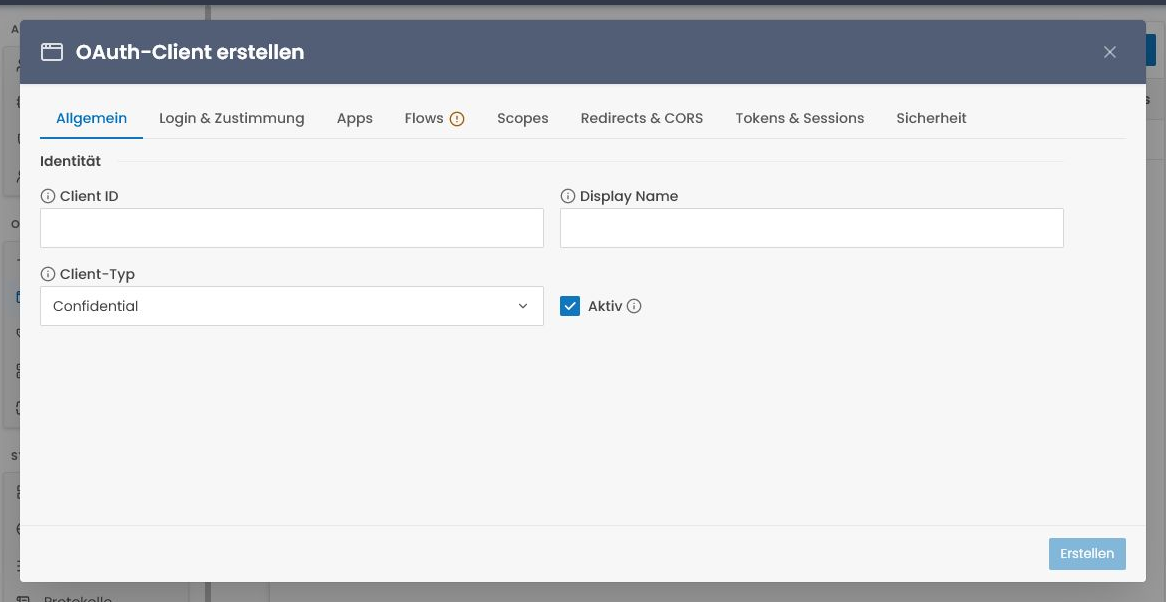
The create modal exposes the full configuration up front in one expert editor: General, Login & Consent, Apps, Flows, Scopes, Redirects & CORS, Tokens & Sessions, and Security. Every tab edits the same draft and the footer action persists the complete client in one request. Nothing has to be created first and completed in a second pass.
authorization_code clients: two create-time requirements
For an authorization_code client the Create button stays disabled until you have both: at least one Redirect URI (URLs tab) and the authorization_code grant (Grants tab). This stops you from silently producing a client that can't complete a login.
Required fields
- Client ID — unique technical identifier (
web-app-prod,mobile-ios, …). Sent in every OAuth request. - Display Name — what the user sees on the consent screen
- Client type — see below
Client types
There are exactly two client types — public and confidential:
| Type | For | Secret? |
|---|---|---|
| Confidential | Server-side web apps (ASP.NET, Node, Rails) — can store secrets | Yes |
| Public | SPAs and mobile apps — can't safely store secrets | No, PKCE only |
Client authentication: secret or private key
A confidential client proves itself at /connect/token (and the introspection, revocation and PAR endpoints) in one of two ways:
- Client secret (
client_secret_basic/client_secret_post) — generated at creation, shown once, rotatable with Regenerate Client Secret. private_key_jwt(RFC 7523 / OpenID Connect Core §9) — register the client's public keys as a JSON Web Key Set on the Security tab (JsonWebKeySetin the admin API and the realm manifest): RSA or EC keys, public parts only, each with akid. The client then sends a JWT it signed with the matching private key (headertyp: client-authentication+jwt,iss=sub= itsclient_id,aud= the token endpoint,jti, shortexp) asclient_assertionwithclient_assertion_type=urn:ietf:params:oauth:client-assertion-type:jwt-bearer. No shared secret leaves the client. Create a confidential client with a key set and no secret to get a client that authenticates with assertions only; the Security tab shows which credentials exist. Rotate by replacing the key set (old keys stop working at once); removing the last credential is refused.
Both may coexist. Service-account credentials (M2M clients) keep their own secret lifecycle and do not take a key set; dynamic client registration does not accept private_key_jwt either (see the OAuth API reference).
Machine-to-machine? Link a Service Account
There is no separate "service" client type. For server-to-server flows with no user involved, use a Service Account. Selecting client_credentials in the Flows tab reveals the required Service Account field. You can select an existing account or create a new one directly in the client editor. The optional new Service Account, client, grant and ownership link are then persisted atomically by the single Create action.
Consent type
| Type | Behaviour |
|---|---|
| Implicit | First-party app — no consent screen, immediate redirect |
| Explicit | The user must click "Allow" once per scope set |
| External | Consent is obtained out-of-band; Modgud doesn't intervene |
Applications
The Applications multi-select binds the client to one or more apps. Empty means realm-wide/unassigned for App-scope entitlement; it does not mean that tokens automatically receive every App's permissions.
Picking multiple apps means the client may request resource-bearing scopes from each of them. If a request targets orders-api and billing-api and includes the roles scope, the resulting principal can contain resource_access["orders-api"].roles and resource_access["billing-api"].roles. The keys are API Audiences, never App slugs inferred from the multi-select.
Redirect URIs
One per line. Modgud strictly checks that the redirect URI presented in the auth request is one of these.
For SPAs and mobile use a deep link (com.example.app:/oauth/callback) or a HTTPS callback page on your domain.
Access Token Type
New clients default to Reference. Two options:
| Type | What it is | Validation |
|---|---|---|
| Reference (default) | Opaque random string — carries no claims on the wire | The resource server must call /connect/introspect on every request to resolve it |
| JWT | Self-contained signed token — the claims are inside the token | The resource server validates it locally against the realm's signing key (JWKS); no callback to Modgud |
A resource server configured for local JWT validation expects a JWT. Keep the default Reference format when you want every token resolved and immediately revocable at the introspection endpoint. The .NET resource-server library uses one AddModgudResourceServer method; its TokenMode accepts JWTs, reference tokens, or both.
Require Pushed Authorization Requests
Toggle the Require Pushed Authorization Requests (PAR) checkbox in the client editor. When set, this client must use Pushed Authorization Requests (RFC 9126): a direct /connect/authorize request from it is rejected, and it has to push the request to /connect/par first and authorize with the returned request_uri. Off by default, and PAR stays available to every client regardless — this only forces it for an individual high-security client (e.g. a confidential back-channel client where you never want request parameters on the front channel). Also settable via the admin API (requirePushedAuthorizationRequests: true) or a declarative provisioning manifest.
Sender-constrained tokens (DPoP)
DPoP (RFC 9449) binds an access token to a key the client proves it holds, so a stolen token is useless without the private key. Two checkboxes in the client editor harden a client that supports DPoP; both are off by default and independent of each other. See the DPoP reference for the protocol detail.
- Require DPoP — reject this client's token requests that carry no DPoP proof (
invalid_dpop_proof). Without it, DPoP is still offered: a client that sends a proof gets a bound token, one that doesn't gets an ordinary bearer token. Turn it on to forbid the unbound fallback for a high-security client. - Require DPoP nonce — additionally require a server-issued nonce in the client's proofs. The first proof (which has none) is answered with a
use_dpop_nonceerror plus a freshDPoP-Nonceheader, and the client retries with the nonce embedded. This stops a client from pre-computing proofs and gives the server a freshness lever. Only meaningful alongside DPoP use — pair it with Require DPoP to force the whole handshake.
Both are also settable via the admin API (requireDpop, requireDpopNonce) or a provisioning manifest. Refresh tokens issued to a DPoP client are bound to the same key automatically — no toggle needed.
Back-channel logout
Logout URI (Login & Consent tab): the absolute https endpoint Modgud POSTs a signed logout token to whenever a session that holds this client's tokens ends — user sign-out, RP-initiated logout by another client, revocation from the sessions list, admin force sign-out, deactivation, deletion, expiry. http is accepted on localhost only; private and link-local addresses are refused. Leave it empty for no POST notifications; the Application change feed carries session ends regardless. Send session id (sid) (default on) controls whether logout tokens name the session. The page shows the outcome of the last delivery attempt. Also settable via the admin API (backChannelLogoutUri, backChannelLogoutSessionRequired) and the realm manifest. Contract: Logout propagation.
Allowed CORS Origins
One origin per line (e.g. https://app.acme.example.com). This field is enforced — it's not decorative. For a browser-only SPA doing Authorization Code + PKCE with no backend-for-frontend, Modgud emits the CORS headers on the credentialed OIDC endpoints (/connect/token, /connect/userinfo, /connect/revoke, /connect/par) only when the request's Origin is one of these registered values, so the flow can complete cross-origin. (The public metadata endpoints — /.well-known/openid-configuration and /.well-known/jwks — are readable from any origin regardless.)
Changes take effect within ~60 s
The allowed-origins set is cached per realm for about a minute, so after adding an origin give it up to ~60 s before the browser flow starts succeeding.
Allowed grant types
Pick the grants the client actually needs (multi-select). There are no silent defaults — a client created with zero grants can't mint any token, so the Create button stays blocked until at least one grant is picked. Common combinations:
| Combo | Use case |
|---|---|
authorization_code, refresh_token | Web app / SPA / mobile (with PKCE on public clients) |
client_credentials | Machine-to-machine — but only via a Service Account (see below) |
urn:ietf:params:oauth:grant-type:device_code | A CLI tool or other input-constrained device — see the device flow reference |
urn:cocoar:otp, urn:cocoar:magic, urn:cocoar:passkey | Native passwordless grants for first-party mobile/desktop apps (realm must have Native Passwordless Grants enabled under Realm Settings) — see Native app integration |
No hybrid user-flow + client-credentials clients
A client is either a user-flow client (authorization_code / refresh_token / device_code / …) or a machine-to-machine client (client_credentials) — never both. The split is structural, enforced at the create/update endpoint:
client_credentialsrequires the client to be linked to a Service Account; the Flows tab lets you select an existing account or create one inline before the first save and blocks Create while the link is missing.- A Service-Account-linked client may carry only
client_credentials— adding any user-flow grant alongside it is rejected.
The reverse workflow remains available too: issuing a credential from a Service Account provisions its confidential client and client_credentials grant through the same client-creation validation path.
Capabilities
Capabilities are explicit, per-client grants a realm admin gives on the Flows tab. They are stored next to the grant-type permissions (as cap: entries) and are exported with the realm manifest.
| Capability | Meaning |
|---|---|
cap:trusted-forwarder | The client is a backend-for-frontend that calls the auth endpoints on behalf of browsers. When it authenticates a request with its client secret or a private_key_jwt assertion and sends the end user's address in the Modgud-Forwarded-For header, rate limits apply per user instead of per egress address. It shifts only the source dimension; target, client and App limits still bound the forwarder. Confidential clients only. See Rate limits → Trusted forwarders. |
Trust never depends on who owns the client: any realm admin can grant the capability to any confidential client, and a capability can never lift a limit.
Lifetimes
The Lifetimes tab is available during create and edit. Each field is entered in seconds. Empty token fields use the IdP default; empty client-session fields inherit from the linked Application and then the Realm.
| Field | Default | In seconds |
|---|---|---|
| Access Token Lifetime | 60 min | 3600 |
| Authorization Code Lifetime | 5 min | 300 |
| Identity Token Lifetime | OpenIddict default (no Modgud override) | — |
| Sliding Refresh Token Lifetime | OpenIddict default (no Modgud override) | — |
| Client Session Idle Lifetime | App/Realm policy | — |
| Client Session Absolute Lifetime | App/Realm policy | — |
Access-token, authorization-code and refresh-token defaults are set globally on the IdP (AccessTokenLifetimeMinutes, AuthorizationCodeLifetimeMinutes, RefreshTokenLifetimeDays). The identity-token and sliding-refresh fields have no Modgud-level default — leave them blank unless you have a specific reason to override OpenIddict's built-in value.
Client-session lifetimes control how long refresh-token-backed user sessions may continue. Idle lifetime slides on successful refresh; absolute lifetime never slides. Both accept 1–3650 days (86400–315360000 seconds), and the absolute value must not be shorter than idle. These do not lengthen access tokens.
Editing / regenerating
Open a client by double-click. Most fields can be edited live; Client ID is immutable after creation.
The Regenerate Secret button at the bottom rotates the client secret. Old secret stops working immediately, new one is shown once — copy it now.
Cloning a client
Client ID is immutable, so to stand up a near-identical client — or to effectively rename one — clone it. List → right-click → Clone. The Create modal opens pre-filled: scopes, grants, redirect URIs, app links, token lifetimes and the rest are copied; only Client ID is blank (enter a new one). The client secret is not copied — a fresh one is generated on create and shown once, exactly as for a brand-new client. DCR registration metadata and any Service-Account link are dropped, so the copy is a plain admin-created client.
Deleting
List → right-click → Delete. Soft-deleted entries can still be queried for audit purposes but are excluded from the OAuth flow.
Tips
One client per integration, not per environment
Use a single client acme-web and configure multiple redirect URIs for prod/staging/dev — instead of three separate clients. Easier to maintain, fewer secrets to rotate.
Don't share secrets
A client secret is the proof a confidential client is legitimate. Don't paste it into source control, email it, or include it in JS bundles. Use environment variables / secret stores.