

OAuth Scopes
Scopes define what permissions an OAuth client may request from the user — and which resources (APIs) the resulting token may target.
Standard scopes (seeded per realm)
Every realm is seeded with these six scopes — they're created at realm provisioning and you don't need to manage them:
| Scope | Contents |
|---|---|
openid | Subject (user ID) — required for any OIDC request |
profile | First/last name, preferred username |
email | Email address + email_verified flag |
offline_access | Allows issuing refresh tokens |
roles | Adds the user's App roles to each matching registered resource_access[<audience>] block |
permissions | Adds bypass-pre-expanded permissions, narrowed to each matching OAuth API's declared subset |
The OIDC-standard phone and address scopes are recognised by OpenIddict but not auto-seeded — add them manually per realm if you need to expose those claims.
Defining your own scopes
For your own APIs/resources you define custom scopes — e.g. acme.read, acme.write, crm.api.
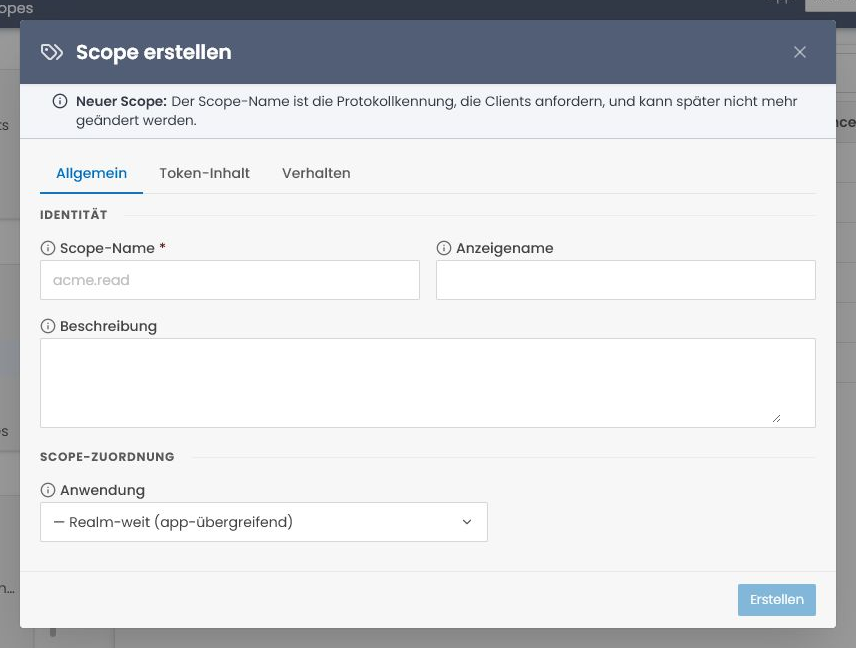
Administration → OAuth & Federation → OAuth-Scopes → Create.
Fields
The editor groups the settings into three tabs:
- General — immutable technical name, display name, description and optional App binding. No application means realm-wide (cross-app, like the standard OIDC scopes).
- Token content — API audiences and OIDC user-claim names included for the scope.
- Behavior — active state, consent presentation, discovery visibility and Dynamic Client Registration eligibility.
The scope name is the exact value clients send in scope=… requests (for example acme.read). It cannot be changed after creation; clone the scope when you need a new name.
The six seeded standard scopes can be opened for inspection, but are shown read-only because they are managed by the IdP.
Application binding
App-scoped scopes can only be requested by OAuth clients whose AppIds list contains the same App. The standard OIDC scopes are global (AppId = null), so any client may request them.
If a client requests an app-scoped scope it isn't entitled to, /connect/authorize rejects with invalid_scope.
API audiences
An audience identifies the resource server (API) that accepts tokens. It can be a stable identifier or an absolute URI. Example:
- Scope:
acme.read - Audience:
acme-api
When a client requests scope=acme.read and gets back an access token, the token's aud claim contains acme-api — the Acme API checks exactly that during token validation and rejects everything else.
Audience mismatch
If the audience here is spelled differently from how the API checks during validation, every API request fails with 401 Unauthorized — invalid audience. For URI audiences, scheme, host, trailing slash and port are significant. Keep both sides in sync.
Discovery visibility
Every scope has a Show in discovery document flag. When true, the scope's name is listed in the realm's /.well-known/openid-configuration under scopes_supported. When false, the scope still works for normal client requests, but is not advertised publicly.
Discovery visibility is opt-out, not opt-in — anything you create normally is visible:
- OIDC standard scopes (
openid,profile,email,offline_access,roles,permissions) default totrue. - Scopes you create in the admin UI (including app- / API-scoped ones) also default to
true. Untick the flag if you'd rather keep a scope name out of public metadata. - Implicit scopes auto-created from an OAuth API (the one-click "Create implicit scope" path) are the only exception — they default to
false, so a one-click bootstrap doesn't leak the resource server's name into public discovery. You can flip the flag on them afterwards if you want them advertised.
Hiding a scope from discovery is privacy-by-default that prevents drive-by enumeration of which APIs a tenant operates; it is not access control (see the tip below).
Hiding is tenant isolation, not security
Hiding scopes from discovery is defense-in-depth. An attacker can still try arbitrary scope= values at the token endpoint — they'll just have to guess instead of reading the list. The realm-DB validation is the actual access control.
Allowing a scope on a client
In the OAuth client → tab Scopes → add the new scope to "Allowed scopes". Only then may the client include it in its authorisation request.
Cloning a scope
Scope Name is immutable, so to make a variant of an existing scope, clone it. List → right-click → Clone. The Create modal opens pre-filled — display name, description, resources, user claims, the app binding and all the flags are copied; only Name is blank. A standard OIDC scope can be cloned too — the copy is an ordinary editable scope.
Deleting a scope
List → right-click → Delete (soft delete). Standard scopes cannot be deleted; their menu action is disabled.
Active tokens stay valid
Already-issued tokens carrying the deleted scope remain valid until their lifetime expires — deletion only affects newly issued tokens. For compromised scopes, also revoke active tokens or set the shortest practical token lifetime.
Tips
Scope granularity
A rule of thumb: one scope per semantic operation, not per endpoint. Example:
- good:
acme.read,acme.write,acme.admin - bad:
acme.task.list,acme.task.detail,acme.task.create,acme.task.update, …
Too granular = the consent screen becomes unreadable. Too coarse = apps need more power than they should.
Dot namespacing
Convention: name scopes <resource>.<action> (acme.read, crm.write). Makes it obvious in consent screens and token inspectors which scope belongs to which API.